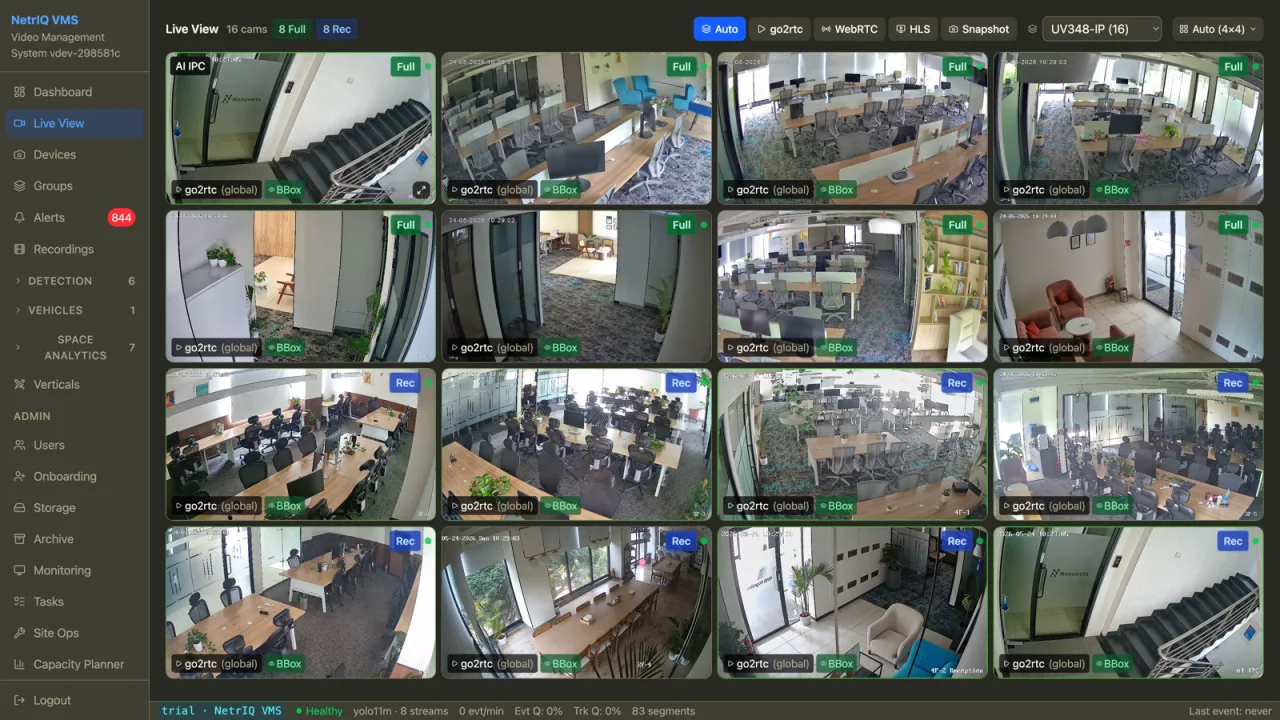
Below is the live feature set — what is in production, deployed, and used by customers. We don’t list roadmap items here.
NetrIQ is camera-agnostic. We connect to whatever you have — over the network you have — and present it as one system.
Native support for Hikvision, Dahua, CP Plus and Sparsh; ingest from Frigate NVRs; and any ONVIF / RTSP camera.
Network scanner finds cameras on the LAN, detects codecs, and registers them in bulk.
RTMP ingest from remote SIM cameras via relay. Per-device auth keys, no public IP needed at the camera.
WebRTC streaming with sub-second latency. H.265 and H.264, automatic codec fallback when a stream fails to decode.
Segment-based recording with configurable retention. Detection events linked to the exact frame in the recording.
Click an alert and the timeline opens at the exact frame — a perceptual-hash anchor closes the sub-vs-main-stream timing gap that normally costs ten seconds of scrubbing.
For cameras that drop RTSP or refuse it, NetrIQ auto-falls-back to snapshot polling so the feed keeps flowing.
Bounding boxes drawn on the live feed with class, confidence, and colour-coded labels.
Pan/tilt/zoom from the live grid for PTZ cameras. Native 360° fisheye dewarp with up to four virtual sub-views per dome.
Camera groups with per-group toggles for detection, sharing, and view layout.
Generic VMS detects motion. NetrIQ detects what is moving, identifies it across cameras, and only surfaces what matters.
Real-time inference for person, vehicle, animal, and common object classes. Switchable models, configurable per-camera frame rate.
HSRP-tuned OCR with multi-frame consensus per track. Handles regional plate formats and low-light gate conditions. Vehicle registry and gate log are auto-populated.
Mark a person, vehicle, or object once. NetrIQ tracks every appearance across every camera using OSNet Re-ID and forensic backfill.
Re-identification ties the same individual or vehicle across disjoint feeds. Class-aware so handbag-PoI doesn’t match a person.
Run the same AI over recorded footage. Pick a time range and cameras, get back detections, plates, and PoI matches retroactively.
Counting tasks for any class, on demand. Occupancy zones report dwell and presence. Snapshots stored as proof.
Draw zones on the camera view. Detection events fire only inside the zone — cuts false positives sharply.
Four rule families out of the box: unmanned gate, occupancy threshold, intrusion, and tailgating. Configure once, fire only when context says so.
Type “men in red shirt near gate yesterday after 9pm” in plain English. The LLM normalises it; SigLIP+pgvector returns clips ranked by visual similarity. Plate-only queries short-circuit to the OCR lane.
Pure-CV detection of a second person slipping through behind an authorised entry — without depending on access-control integration.
Place cameras on an uploaded floor plan with field-of-view cones. Zones map to the physical space, not just the camera frame.
Activity heatmaps, footfall, dwell. Daily and hourly aggregates per camera and per zone.
Mark a Person of Interest from any detection — a suspect, a vehicle, a delivery rider, a misplaced bag. NetrIQ backfills sightings across the time range and cameras you choose, then keeps watching forward in real time.
Every vehicle through every gate ends up in the registry with plate, time, camera, and image — searchable by plate fragment, by time, by gate. Track regulars, flag unknown vehicles, build whitelists.
Detection is only useful if it routes to the right person at the right moment, or to the right query after the fact.
In-app, email, and WhatsApp (Twilio) dispatched through one engine. Per-audience routing, with chain alerts firing concurrent literals so escalation paths don’t race each other.
Every entry and exit captured automatically. Searchable, exportable, image-attached.
Every event with thumbnail, class, confidence, camera, time, and link to the recording frame.
Intelligent filtering reduces duplicate alerts so the inbox stays signal, not noise.
Three-gate writer for evidence packs — SHA-256 manifests, hashed clips, and a signed export log so the bundle stands up downstream.
Admin, operator, viewer. Permissions enforced at the API, not just the UI.
One console across every site. Group cameras, route alerts, and assign access per site.
Ten palettes, configurable font, per-section type sizing. Co-branded deployments without forking the front-end.
Twelve surfaces you'll touch in a real deployment — from the operations dashboard to the gate log, from analytics to the device list. People’s faces are redacted in every screenshot below.
Same engine across the line. Editions differ in which capabilities are unlocked, not in which code base you run.
The full surface area. Built for multi-site estates with mixed-vendor cameras and central security operations.
Fit for: enterprise security operations, large campuses, multi-tenant IT office estates, hospital chains.
Watching — not just recording — for one or a handful of sites that don’t need the enterprise extras.
Fit for: gated communities, schools, mid-size offices, single-site retail, restaurants and clinics.
The video management foundation, with AI capabilities you can switch on per camera as budgets allow.
Fit for: estates standardising on a software VMS today and bringing AI online tier by tier without a rip-and-replace.
The Suite engine, tuned for food-service operations — security plus food-safety plus ops in one console.
Fit for: QSR chains, fine-dining groups, cloud kitchens, central commissaries.
All editions share the same engine, the same camera support, and the same deployment options. You can move up an edition without re-installing — capabilities flip live on the existing stack.
We host the console; the Site Agent at your premises bridges cameras over a relay. No port forwarding, no static IP, no VPN to maintain.
Deploy the full stack on your own server. Hikvision, Dahua, ONVIF cameras feed in directly. Air-gapped if you want it that way.
Recording stays local for bandwidth and retention; detection metadata, alerts, and remote view ride the cloud. Default for most customers.
A short live walkthrough — we connect to a demo deployment with real cameras and real footage.